Your first match, without the guesswork
Death in the Box is a Roblox survival game by ARK-ADE. You sit around a table while the clown runs events, distributes cards and puts players in danger. Your goal is to be the last survivor. You cannot choose every outcome, but reading the right prompt and understanding your hand prevents avoidable mistakes.
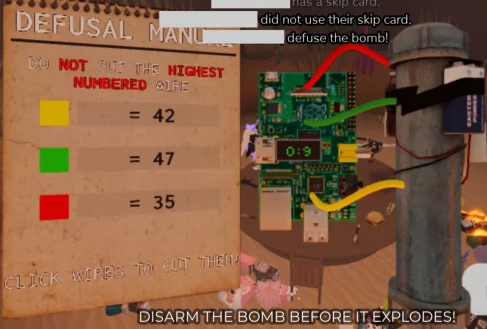
Start with three habits: identify the event, check whether it asks you to act, and read your relevant card before relying on it. If you are already stuck in a bomb round, go straight to the bomb defusal guide.
Official promotional artwork from the Roblox game page.
Join the correct game
Use the Play on Roblox link in the header. The game is called Death in the Box, and its creator is ARK-ADE. Similar names on Roblox can lead to different experiences with different rules. Advice for another game will not explain this one's card controls or bomb manual.
The official description says you can play with up to fifteen other players. A server's capacity is not a guarantee that sixteen human players will sit in every match. The community wiki describes bots filling underpopulated matches. Do not assume every seat belongs to a human who will honor a deal you propose in chat.
Before a match, look at the lobby's available choices rather than buying a pass to solve a problem you have not encountered. Cosmetics, wheel spins and gameplay decisions are separate systems. A different chair does not teach you the timing of a knife prompt.
Learn the three card behaviors
The word Active can be misleading if you expect every card to have a use button. The community card reference distinguishes three behaviors:
| Card type | What you should do |
|---|---|
| Active | Read the trigger. These cards activate automatically when their conditions are met. |
| Passive | Keep the effect and remaining turns in mind while you play. |
| Activation | Read the effect, choose an appropriate target if required, then use the card control. |
Positive and negative describe a different property: whether an effect generally helps or harms its holder. Those labels do not tell you whether pressing a button is required. A helpful card can be automatic; an activation card can affect another player.
Read the small exception text too. The pictured Blank card in our card guide says that it is disabled in PVP events. Treating it as universal gun protection is a much more serious mistake than forgetting its color.
Use a short routine every turn
- Read the event name and the instructions currently displayed.
- Check whether you are the selected player, a voter, a target or an observer.
- Identify the requested input before the timer expires.
- Check a card only if its effect applies to that situation.
- After the event, review your hand again; cards and counters can change.
You do not need to memorize every event to use this routine. It helps you avoid reacting to another player's role, waiting during an interactive event, or pressing a remembered button when the current prompt asks for something else.
When the game gives you no input, there may be nothing to click. Luck is part of the game's official description. A round ending badly does not automatically mean you missed a hidden control. Look for the difference between a failed input and an outcome decided by the event.
Pick one mechanic to learn first
For your first few matches, concentrate on card behavior and one recurring interactive event. Trying to learn every secret, wheel reward and special mode at the same time makes it harder to recognize the prompt in front of you.
Knife events require attention to the live dodge prompt. Bomb defusal requires reading a manual and comparing wire values. Gun events require identifying who is shooting and whether the event is PVP. These are different tasks; a general instruction to "click fast" is not enough for all three.
Open the event survival guide between matches. It groups events by the decision they ask you to make, so you can find the relevant section without reading everything during a countdown.
Check the mode before reusing a strategy
The community mode reference lists Free for All, Bloodbath, Double Cards, Four Teams and Roundabout among the voting choices. Bloodbath increases elimination events, Double Cards changes card distribution, and teams change which players share your interests. Read the mode shown in your own match rather than assuming your last lobby's settings continue.
Seasonal modes and developer-run events have separate availability. A video showing a giant table, unusual rewards or many shields may depict a special event. It does not prove that joining an ordinary public server unlocks the same setup.
In a team mode, check the team assignment before choosing a target. In a card-heavy mode, review new cards after each distribution. In an elimination-heavy mode, watching the event prompt matters more than browsing the lobby's reward systems.
What to do after your first loss
Ask one specific question: did you misunderstand the event, overlook a card exception, miss an input or receive an unfavorable outcome? Each answer leads to a different next step. Practice reading a manual for the first, inspect the card text for the second, and pay closer attention to the control for the third.
If the round gave you no relevant choice, avoid inventing a guaranteed trick from a single attempt. Make the next match useful by learning another recognizable mechanic. Better decisions improve your play; they do not remove the game's luck.
References
Roblox game description, community Cards reference, Gamemodes, and Bots. Community descriptions can lag behind updates; the live prompt takes precedence.