Cash, spins and cosmetics
Cash, wheel spins and cosmetics are different reward systems in Death in the Box. Start by checking which balance a purchase uses and what it gives you. A cosmetic reward changes your appearance or presentation; it is not a promise of protection during an elimination event.
The official game description advertises a 15% cash bonus for group members and a 25% cash bonus for Roblox Premium players. It does not explain how those bonuses combine. Do not add them together and assume a guaranteed 40% bonus.
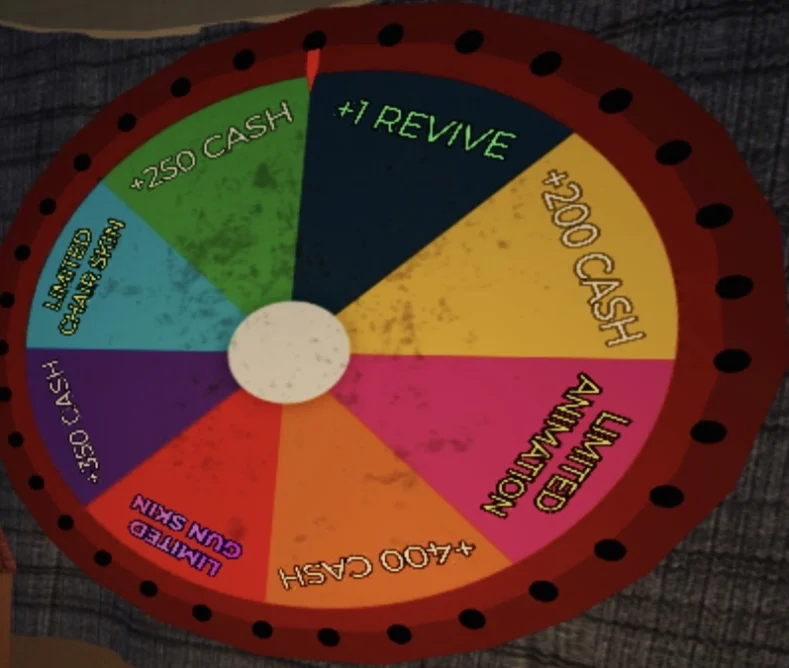
Game screenshot from the community wheel image. A prize segment's visible size is not proof of its drop rate.
Separate cash from Robux
Before confirming anything in the shop, identify the currency. In-game cash is a game balance; Robux is Roblox's platform currency. Earning more of one does not mean you can afford an item priced in the other.
Use the displayed confirmation screen as the final reference for price and contents. A guide or an old video may show a previous price, seasonal stock or a pass benefit that has since changed. If a purchase would use Robux, pause long enough to read the item and recipient rather than clicking through from habit.
Cash bonuses should also be distinguished from reward odds. A bonus attached to cash earnings does not, by itself, say that a wheel is more likely to award a rare cosmetic. Treat those as separate claims unless the game explicitly connects them.
Check the free benefits first
The group bonus is described on the official game page. Use the creator's group link from that page, so you do not join an unrelated group with a similar name. Check the game's current instructions if a bonus does not appear immediately; repeatedly spending cash is not a useful way to diagnose a missing membership benefit.
Premium is a Roblox subscription benefit, not a free setting inside Death in the Box. If you already have it, the advertised bonus may matter to you. If you do not, a single game's cash bonus is only one part of a subscription decision. Compare the actual platform offer before buying anything.
Neither advertised bonus supplies a published stacking formula on the game description. If you are comparing two earning sessions, keep their circumstances comparable. Different event outcomes and rewards can otherwise make the apparent multiplier misleading.
Use the daily wheel carefully
The community Cosmetics page describes a daily wheel and additional spins among the game's reward systems. Check the live wheel's available spin count and cooldown. The screenshot above illustrates the interface, but it cannot confirm your account's present entitlement or the current reward pool.
A spin is a chance at a displayed reward, not a purchase of the reward you personally want. If a limited cosmetic appears on the wheel, inspect any availability information shown in the current game. Old screenshots can preserve prizes long after an event ends.
Do not infer exact percentages from the drawing of the wheel. Without current published odds, a large-looking segment is not enough to calculate an expected payout. Several losses or wins in a row also do not establish a reliable probability.
Before obtaining extra spins, decide whether you are happy with the possible outcomes. If your only acceptable result is one rare item, random rewards may be a poor fit for that goal. Check whether the shop offers a direct alternative rather than assuming more spins guarantee progress.
Decide what to buy in the shop
The community reference groups cosmetics into categories such as guns, chairs and character effects. Read each live item's description. A gun skin should not be confused with an event's permission to shoot, and a chair should not be confused with a defensive card.
For a purchase you can choose directly, compare three things: its current cost, how you equip it, and whether it is the appearance you actually want. If the shop shows a preview, inspect it before confirming. For random rewards, compare the whole possible pool rather than mentally pricing only the best prize.
You can also keep cash until you understand the systems better. There is no gameplay reason to rush a cosmetic purchase while you are still learning how cards trigger or how to survive events.
What about codes and passes?
The community Codes page describes entering codes in the settings text field for cash or spins. Codes can expire. We do not label a code "working" just because an older list still contains it; check the developer's current announcements and the game's response when redeeming it.
For a pass, open its Roblox purchase listing and read the current benefits and price. Community tables may describe previous prices or benefits. In particular, an extra vote or an extra spin is not the same as a guaranteed match win. Avoid buying a pass to fix a misunderstood control.
If a redemption or purchase does not appear to work, distinguish an expired code, an already-redeemed code and a missing entitlement. Keep the relevant platform transaction information private when seeking support, and contact the game's developer through official channels for account or purchase issues. This fan guide cannot credit cash or restore items.
References
Official Roblox game description, community Cosmetics reference, Codes, and Gamepasses. Prices, stock, cooldowns and code availability can change; check the live offer before spending.